Solavixa Media Workflow Tool for Windows
Current version: 1.54.0 Beta
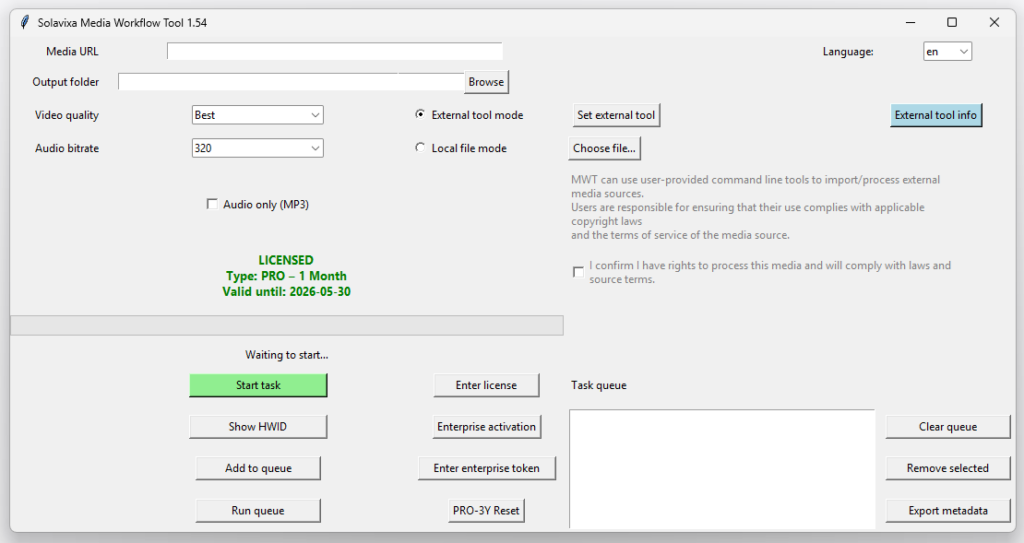
Solavixa Media Workflow Tool is a media workflow tool for Windows users who need a clean desktop application for local media processing, organized output, structured workflows, and reliable license-based access.
MWT helps teams and individual users handle repetitive media tasks with greater consistency, clearer organization, and less manual effort — all in a practical desktop environment.
- ⚙️ Workflow control
- 🗂️ Organized processing
- ⏱️ Less manual work
Structured workflows · Better task control · Practical desktop usability
What MWT helps you solve
Designed for users who need a cleaner, more controlled way to process and organize media workflows. This media workflow tool helps users reduce repetitive manual steps, keep local processing organized, and prepare consistent output without relying on a browser-based workflow.
⚠️ Without structure
- ⚠️Repetitive manual processing
- ⚠️Fragmented tools and unstable workflows
- ⚠️Limited visibility into completed tasks
- ⚠️Inconsistent output and organization
✅ With MWT
- ✅One controlled workflow
- ✅Repeatable task execution
- ✅Clear processing overview
- ✅More predictable results
Media Workflow Management Software for Windows
MWT is media workflow management software for Windows designed to simplify practical media handling while keeping every step clear, reliable, and easy to control. It helps users organize repeatable media workflow tasks, local processing, output handling, and supporting tools in one controlled desktop environment. Unlike browser-based media workflow solutions, MWT keeps processing local and gives users direct control over their files and workflow.
⚙️ Media workflow automation
Handle recurring media-related tasks in a more structured and repeatable way
🖥️ Local processing
Work in a desktop environment designed for practical day-to-day use and controlled local workflows.
🔗 Optional external tool support
MWT can integrate with user-provided external tools while keeping the application itself focused on orchestration and workflow control.
🗂️ History and metadata
Keep a clear record of completed tasks and export structured metadata for further use.
Who MWT is for
MWT is designed for users and teams who need clarity, repeatability, and better control in media-related workflows.
- 👥 Media and technical teams
- 🗄️ Archives and internal repositories
- 🧩 Production and post-processing workflows
- 🛡️ Organizations that value traceability and consistency
⛔ MWT is a workflow and processing tool — not a downloader.
Why Choose Solavixa Media Workflow Tool?
Solavixa Media Workflow Tool is designed for users who want a focused desktop workflow instead of a complicated online platform. The application helps organize local media processing tasks, prepare structured output, and keep the workflow clear from input to final result.
This media workflow tool is suitable for users who prefer working with local files, predictable desktop performance, and a clean interface without unnecessary distractions. It is especially useful when media tasks need to be repeated, reviewed, or processed in a consistent way.
The goal of Solavixa MWT is not to replace every professional media application. Instead, it provides a practical workflow layer for everyday processing tasks, licensing-controlled access, and a simple environment that keeps users in control of their files and outputs.
Licensing options
Choose the licensing model that fits your workflow — from evaluation to professional and enterprise use.
Trial
A limited version for product evaluation and first-time testing.
Pro
Designed for regular use with broader workflow capabilities and a smoother day-to-day experience.
Enterprise
A business-focused option for dedicated environments and long-term deployment.
ℹ️ Legal and technical note
🔹MWT includes components based on FFmpeg under its applicable license terms. Support for external tools is optional and user-provided. The application does not bundle or distribute third-party content acquisition tools. Solavixa MWT is built for Windows desktop use and follows a local-first workflow approach. You can learn more about the Windows platform on the official Microsoft Windows website.
Ready to try MWT?
Start with the trial version, explore the workflow, and choose the licensing option that fits your use case.