Solavixa Web Archive Studio for Windows
Current version: 2.1
Professional web archiving, AI conversation preservation, and image-to-document conversion for Windows.
Solavixa Web Archive Studio 2.1 is a professional Windows desktop application for preserving web content and turning digital sources into structured, reusable documentation.
Archive web pages, local HTML files, official ChatGPT export ZIP conversations, and standalone images or screenshots from one focused application. Create customer-ready outputs in PDF, editable DOCX, offline HTML, Markdown, OCR text, content analysis, and organized asset folders.
SWA is designed for content that should remain useful after capture — not only visually preserved, but also searchable, editable, reviewable, and suitable for long-term documentation.
- ⚙️ Web URL, Local HTML, official ChatGPT export ZIP, and Image / Screenshot input
- 🗂️ Visual PDF, editable DOCX, offline HTML, Markdown, OCR TXT, analysis, and asset export
- ⏱️ Full-content and selected-section web capture
- 📝 Structured AI conversation preservation
- ∑ Mathematical content, equations, images, files, and visual regions preserved where appropriate
- 💻 Image / Screenshot → Editable DOCX with local Auto OCR
- ⚙️Resume support for interrupted archive runs
- 🗂️Professional redesigned interface in SWA 2.1
Digital archives · AI conversation preservation · Editable documents · Offline documentation · Local OCR
What SWA helps you solve
Important digital information is increasingly stored inside long web pages, browser applications, AI conversations, local HTML documents, screenshots, and exported data packages.
Saving a page as a screenshot or copying text manually often loses structure, images, mathematical notation, attached files, or the context needed later.
SWA provides one structured workflow for turning these sources into organized offline documentation.
⚠️ Without structure
Important pages can be difficult to preserve consistently. Long conversations may become fragmented across screenshots, ordinary copy-and-paste can lose formatting and mathematical content, and exported files may separate text from images or supporting assets.
✅ With SWA
SWA creates an organized archive that can combine visual preservation with editable and structured outputs. Depending on the selected source and output formats, the result can include PDF, DOCX, HTML, Markdown, OCR text, analysis, images, files, and supporting archive data.
Website Archiver for Windows and ChatGPT Archives
SWA is designed for capturing long pages and web applications while retaining both the visible presentation and reusable document content.
🌐 Web URL archiving
Enter a web address and let SWA capture the page using its Chromium-based workflow.
For long or dynamic content, SWA supports several scrolling strategies, including automatic detection, standard webpages, dedicated chat containers, infinite/lazy-loaded pages, full-document capture, and manual fallback.
For normal use, the recommended setup is PNG, content crop, 10 px overlap, Auto scroll, and Archive entire content. SWA_User_Guide_2.1
Archive Entire Content
Enable Archive entire content when the complete page or conversation is required.
SWA removes the screen-capture count limit and works through the available content until the end is reached. A screen capture represents one visible browser position — it is not an A4 page — so final PDF, DOCX, and HTML page counts can differ. SWA_User_Guide_2.1
Partial Capture
When only part of a long page or conversation is needed, disable Archive entire content.
Start from the required browser position and capture upward or downward using the selected direction and screen-capture limit.
This makes SWA useful not only for complete archives, but also for preserving a specific section of a large conversation or document.
📄 Local HTML Archiving
Open an existing HTML document directly from disk and create structured archive outputs without first publishing the content online.
Where available, SWA preserves supporting local resources such as:
CSS, images, fonts, JavaScript, and related assets.
This is useful for saved websites, exported HTML documents, documentation packages, and material that needs to remain readable offline.
🤖 ChatGPT export ZIP support
SWA can work directly with an official ChatGPT data export ZIP.
Select the export package, load the conversation list, choose the required conversation, and create structured documentation without browser scrolling.
Supported output can include:
PDF, editable DOCX, offline HTML, Markdown, copied images and files, manifest information, and supporting assets.
This workflow is particularly useful for preserving long AI research sessions, technical discussions, project development, mathematical work, and other conversations that need to remain accessible outside the original service.
🤖 Important OCR Note
OCR is a recognition aid rather than a guarantee of perfect transcription.
Text recognition can be affected by image resolution, contrast, language, typography, mathematical notation, and visual complexity. Auto classification can also occasionally preserve ordinary text as an image or interpret a symbol incorrectly.
For important documents, always review the OCR regions and the final DOCX before publishing or sharing it. The application deliberately provides review and correction tools for this reason.
📦 Multi-format export
PDF Visual Archive
Preserves the visual appearance of captured web content. ChatGPT ZIP import can produce a structured document-style PDF.
DOCX Editable Document
Creates editable text with headings, lists, code blocks, original content images, and preserved mathematical content where supported.
HTML Offline Archive
Creates a locally readable HTML archive with available supporting assets.
Markdown
Creates a portable text-based representation useful for editing, search, version control, and further processing.
OCR from Web Images
Optionally extracts text from captured or embedded web images. This is separate from the dedicated Image / Screenshot → DOCX workflow.
Content Analysis
Creates structured archive analysis automatically when suitable content is available.
The current User Guide describes these output roles separately so users can choose only the files they actually need.
🔍 Customer and Advanced Output Modes
Customer
Recommended for normal use.
Creates a cleaner client-facing output folder containing the selected final archive files.
Advanced
Keeps additional technical diagnostics, state files, logs, and supporting data useful for troubleshooting and verification.
🗂️ Resume Interrupted Archives
Long archive jobs do not always have to be restarted from the beginning.
When a supported run is interrupted by a browser problem, application interruption, system restart, or another incomplete operation, SWA can use the state stored in the archive folder to continue the job.
Resume is intended for continuing the same interrupted archive, not for appending unrelated content to a completed archive.
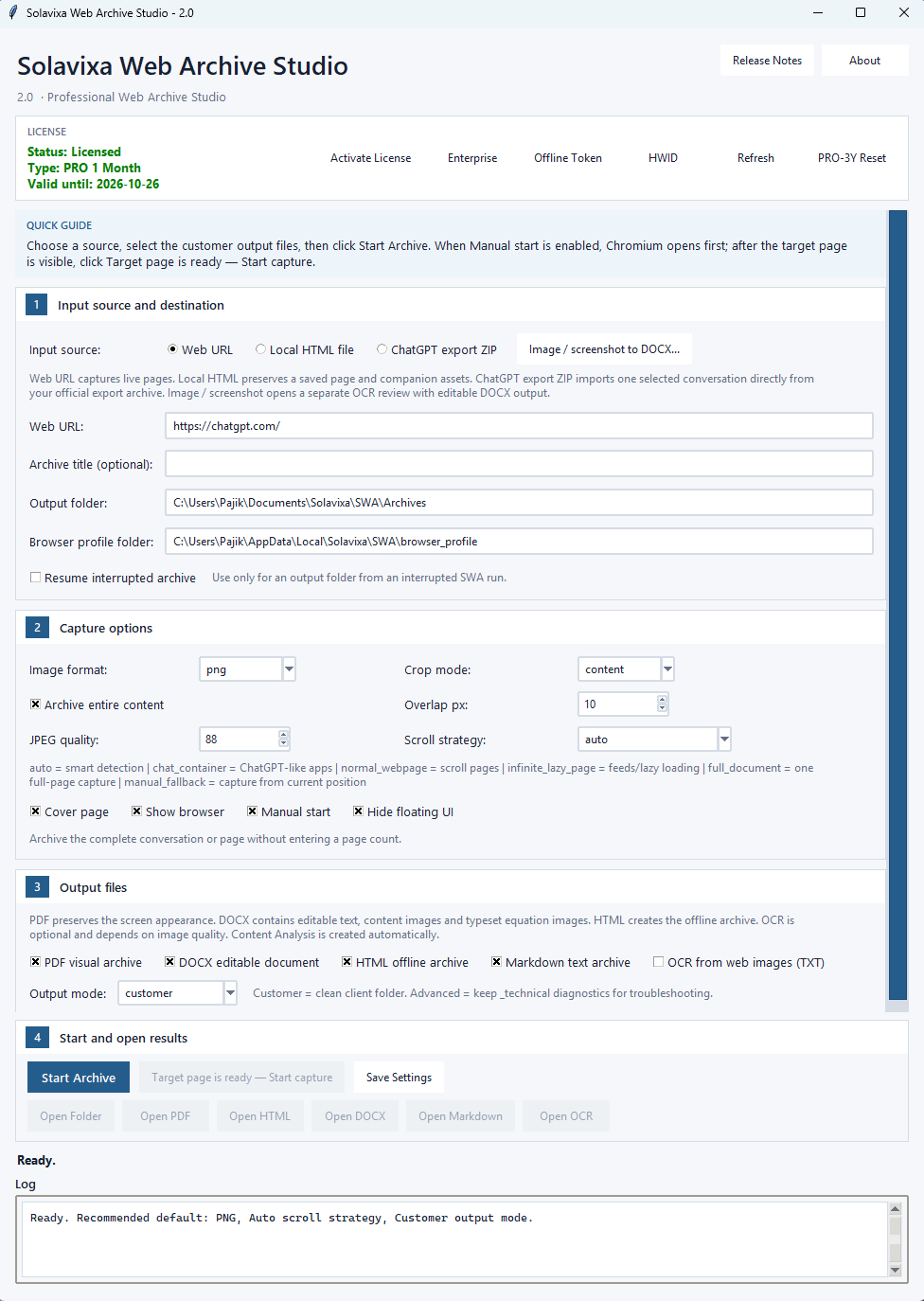
🗂️ Professional Interface in SWA 2.1
SWA 2.1 introduces a redesigned professional interface focused on clarity rather than visual effects.
The application is divided into four guided workflow sections:
1 — Input source and destination
2 — Capture options
3 — Output files
4 — Start and open results
Only fields relevant to the selected input source are shown where appropriate, reducing unnecessary controls.
The application window also adapts its initial height to the usable Windows desktop area, while the dedicated OCR editor uses the same visual design and keeps its review and export controls accessible.
Image OCR to Editable DOCX
Turn a screenshot into a usable Word document
SWA 2.0 includes a dedicated workspace for converting a standalone image or screenshot into a hybrid editable DOCX document.
Instead of forcing everything through OCR, SWA combines two approaches:
ordinary text can remain editable, while equations, mathematical symbols, graphics, uncertain OCR content, and other visually sensitive regions can remain preserved from the original pixels.
The workflow supports PNG, JPEG, WebP, BMP, and single-page TIFF images. OCR processing uses the locally installed Tesseract engine and does not require an online OCR account or API key. SWA_User_Guide_2.1
Auto OCR
Auto is the recommended starting point.
SWA analyzes recognized text, OCR confidence, mathematical notation, visual content, equations, symbols, graphics, and other areas that may be damaged by conversion to guessed text.
It then proposes which regions should remain:
editable text
or
preserved image regions
Detected display equations can remain complete image regions, while surrounding ordinary text stays editable. Uncertain OCR can also remain visual instead of being replaced with an unreliable character guess. SWA_User_Guide_2.1
Review Before Export
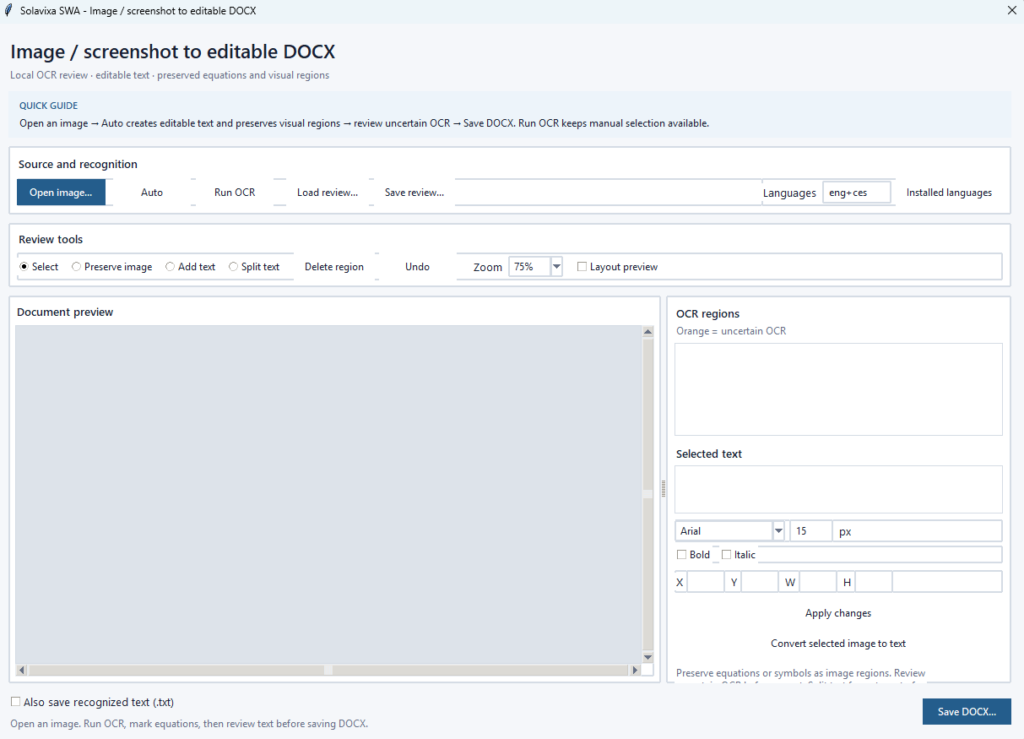
The automatic result remains fully reviewable.
You can correct recognized text, change font family and size, apply bold or italic formatting, adjust region position and dimensions, preserve additional image areas, convert preserved regions back to text, add missing text, split regions, delete unwanted areas, and undo recent changes. SWA_User_Guide_2.1
Reviews can also be saved as .swa-ocr.json files and reopened later with the matching source image.
Hybrid DOCX Output
The resulting Word document combines positioned editable text with original image crops.
This provides a practical compromise between editability and visual fidelity: ordinary text remains usable, while content that OCR could damage can retain its original appearance.
Long images can be paginated onto A4 pages, preserved visual regions are kept together where possible, and recognized text can optionally also be exported to TXT.
Who SWA is for
SWA is designed for users and teams who need reliable digital preservation, structured documentation, and offline access to important content.
- 👥 Researchers and analysts preserving long research sessions and source material
- 🗄️ Consultants and documentation professionals creating reusable project records
- 🧩 AI users archiving important ChatGPT conversations outside the original platform
- 🛡️ Technical users working with mathematical or structured content
- 🛡️ Businesses creating offline documentation and customer deliverables
- 🛡️ Writers, creators, and developers preserving long-form digital content
- 🛡️ Users converting screenshots and scanned visual material into editable Word documents
Local-First Workflow
SWA is a Windows desktop application built around local processing where practical.
Local HTML, ChatGPT export packages, and standalone image conversion operate from the files selected on your computer. The dedicated image OCR workflow uses the locally installed Tesseract engine.
Web URL archiving naturally accesses the selected website and may download resources required for the archive.
Licensing options
Choose the licensing model that fits your workflow — from evaluation to professional and enterprise use.
Trial
The Trial is intended for evaluating SWA before purchasing a license.
Trial status and remaining permitted use are displayed directly in the application. Some professional functionality or continued use requires an activated PRO or Enterprise license.
Pro
Designed for regular professional use and full supported SWA workflows.
Term licenses use a 14-day grace period after the displayed license expiration date, giving the application a defined tolerance window before the term license becomes fully expired.
During the grace period, SWA clearly identifies the license state while the licensed functionality remains available.
After the grace period ends, the application displays License expired and licensed archive operations require a renewed or newly activated license.
Enterprise
Designed for long-term professional and organizational deployment, including supported Enterprise activation and offline-token workflows.
ℹ️ Legal and technical note
🔹Solavixa Web Archive Studio is intended for legitimate archiving, documentation, research, and document-conversion use.
🔹Users are responsible for ensuring that they have the right to access, capture, store, process, and share the content they archive.
⛔ SWA is an archiving and documentation tool — it is not a legal evidence certification service.
Ready to try SWA 2.1 ?
Preserve web content, AI conversations, local documents, and screenshots in formats you can continue to use.