Solavixa Web Archive Studio for Windows
Current version: 0.9.0 Beta
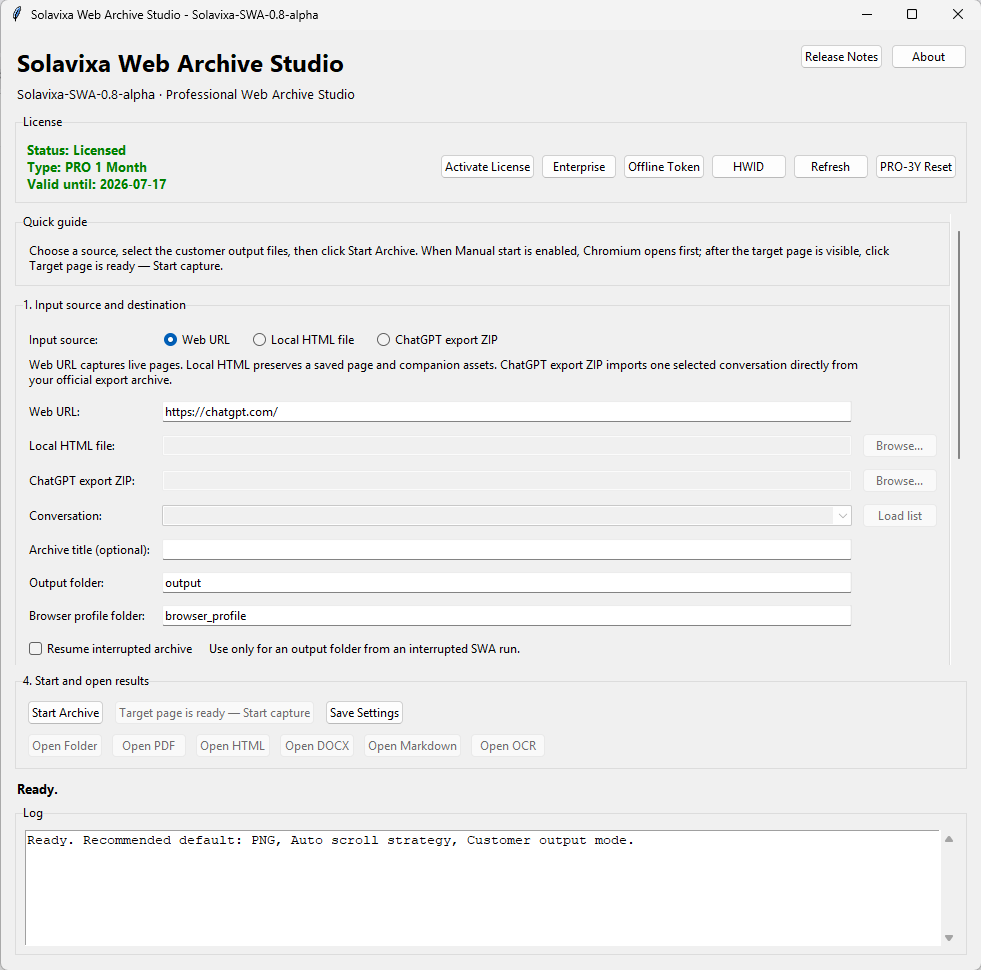
Solavixa Web Archive Studio is a professional web archiving and AI conversation export tool for Windows users who need structured offline documentation, clean multi-format outputs, and a practical desktop workflow.
SWA helps users preserve web pages, local HTML files, and official ChatGPT export ZIP archives as organized archive packages. Create customer-ready outputs in PDF, DOCX, HTML, Markdown, OCR text, manifest files, and structured asset folders — all from one focused desktop application.
- ⚙️ Web, HTML, and ChatGPT ZIP archiving
- 🗂️ PDF, DOCX, HTML, Markdown, OCR, and asset export
- ⏱️ Structured documentation for research, business, and long-form content
Digital archives · Structured exports · Offline documentation
What SWA helps you solve
Designed for users who need a cleaner, more reliable way to preserve important digital content. Solavixa Web Archive Studio helps turn long web pages, local HTML files, and AI conversation exports into structured offline documentation that can be stored, reviewed, shared, and reused.
⚠️ Without structure
- ⚠️Important web content can be difficult to preserve reliably
- ⚠️Long pages and conversations may become fragmented or hard to review
- ⚠️Screenshots alone are often not enough for documentation
- ⚠️Exported files may be missing images, context, or supporting assets
✅ With SWA
- ✅One guided desktop workflow for digital archiving
- ✅Structured PDF, DOCX, HTML, Markdown, and OCR outputs
- ✅Organized images, files, manifest data, and archive folders
- ✅Practical offline documentation for future reference
Website Archiver for Windows and ChatGPT Archives
SWA is a website archiver for Windows designed to preserve web pages, local HTML content, and official ChatGPT archives in organized offline formats. It can save websites and long-form web content to PDF, DOCX, HTML, Markdown, and structured asset folders, while keeping images, files, and supporting content together for reliable offline review and documentation.
🌐 Web URL archiving
Capture web pages and long-form online content with a workflow designed for structured output and offline review.
📄 Local HTML input
Import local HTML files and preserve their content with supporting images, styles, and related assets where available.
🤖 ChatGPT export ZIP support
Import official ChatGPT export ZIP archives, select a conversation, and export it into clean documentation formats.
📦 Multi-format export
Create archive outputs in PDF, DOCX, HTML, Markdown, OCR text, manifest files, and structured asset folders.
🔍 OCR from images
Optionally extract readable text from images when OCR is enabled. OCR quality depends on image clarity and source content.
🗂️ Manifest and asset organization
Keep archive folders structured with images, files, manifest data, and customer-ready output documents.
Who SWA is for
SWA is designed for users and teams who need reliable digital preservation, structured documentation, and offline access to important content.
- 👥 Researchers and analysts
- 🗄️ Consultants and documentation teams
- 🧩 AI conversation users who need exportable records
- 🛡️ Creators preserving long-form web content
⛔ SWA is an archiving and documentation tool — it is not a legal evidence certification service.
Why Choose Solavixa Web Archive Studio?
Solavixa Web Archive Studio is designed for users who want a focused desktop workflow instead of a collection of disconnected browser tools, screenshots, and manual copy-paste steps. The application helps preserve important digital content in a practical structure that can be reviewed later, shared with clients, or stored as part of a project record.
Unlike simple page-saving tools, SWA focuses on customer-ready archive packages. It can generate PDF, DOCX, HTML, Markdown, OCR text, manifest files, and organized asset folders, making the result more useful for documentation, research, and long-term reference.
The goal of SWA is not to replace every professional archiving platform. Instead, it provides a practical Windows desktop tool for everyday digital preservation, AI conversation export, and structured offline documentation.
Licensing options
Choose the licensing model that fits your workflow — from evaluation to professional and enterprise use.
Trial
A limited version for product evaluation and first-time testing.
Pro
Designed for regular use with broader export capabilities and a smoother day-to-day archiving workflow.
Enterprise
A business-focused option for long-term deployment, permanent access, and professional environments.
ℹ️ Legal and technical note
🔹SWA is built for legitimate archiving, documentation, research, and personal or professional record-keeping. Users are responsible for ensuring they have the right to archive, store, and process the content they capture or import.
OCR output is provided as an optional convenience feature and may vary depending on image quality, source resolution, language, and visual complexity. SWA is not a legal evidence certification service and does not provide notarization, legal chain-of-custody certification, or third-party verification.
Solavixa Web Archive Studio is built for Windows desktop use and follows a local-first workflow approach.
Ready to try SWA?
Start with the trial version, explore the archive workflow, and choose the licensing option that fits your use case.