SWA FAQ for Solavixa Web Archive 2.1
This SWA FAQ answers common questions about Solavixa Web Archive 2.1, including web archiving, official ChatGPT export ZIP processing, Image / Screenshot to Editable DOCX conversion, local OCR, PDF and DOCX output, mathematical content, licensing, Windows compatibility, and professional use.
Use this page to understand how SWA works before downloading the Trial, purchasing a license, or starting an archive project.
General SWA Questions
What is Solavixa Web Archive ?
Solavixa Web Archive (SWA) 2.1 is a professional Windows desktop application for web archiving, AI conversation preservation, structured document conversion, and local image OCR.
SWA can turn web pages, local HTML files, official ChatGPT export conversations, and standalone images or screenshots into structured documentation that can be stored, reviewed, edited, or used offline.
What can SWA process?
SWA supports four main input workflows:
- Web URL
- Local HTML file
- Official ChatGPT export ZIP
- Image / Screenshot to Editable DOCX
The available output depends on the selected workflow and options.
For archive workflows, SWA can create PDF, editable DOCX, offline HTML, Markdown, OCR text, structured analysis, manifest information, and organized asset folders.
The Image / Screenshot workflow creates a dedicated editable DOCX and can optionally save recognized text as TXT.
What is new in SWA 2.1?
Yes.
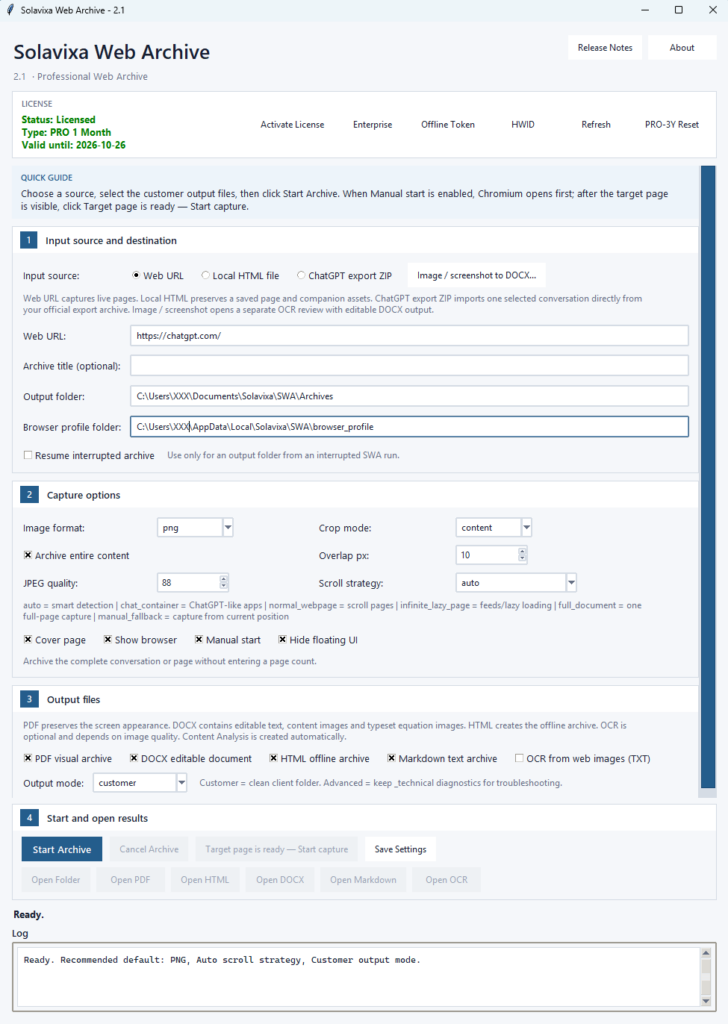
SWA 2.1 introduces a redesigned professional interface together with a significantly expanded image and document-conversion workflow.
Major capabilities include:
- redesigned Professional interface,
- guided archive sections,
- dedicated Image / Screenshot to Editable DOCX workspace,
- local Auto OCR,
- editable text combined with preserved image regions,
- OCR review and correction tools,
- improved preservation of equations and mathematical symbols,
- structured ChatGPT export ZIP conversion,
- full-content and partial web capture,
- resume support,
- and unified professional licensing behavior.
Can SWA archive web pages?
Yes.
Enter a Web URL and SWA opens the page in its Chromium-based capture workflow.
Depending on the source, SWA can capture ordinary webpages, long articles, documentation, supported web applications, conversations, and dynamically loaded pages.
Results can vary depending on the website structure, login requirements, scripts, lazy loading, permissions, anti-bot restrictions, and other technical limitations.
Can SWA archive an entire long page or conversation?
Yes.
Enable Archive entire content when you want SWA to work through the complete available page or conversation.
In this mode, SWA does not require the user to estimate the length in printed pages.
A SWA screen capture represents one visible browser position and is not the same as one A4 page. The resulting PDF, DOCX, and HTML outputs can therefore have different page counts.
Can I archive only part of a page or conversation?
Yes.
Disable Archive entire content, position the browser at the required starting point, and choose a capture limit and direction.
SWA supports:
- Auto
- Up
- Down
This is useful when only one section of a long conversation, article, or web application needs to be preserved.
What scroll strategies does SWA support?
SWA provides several capture strategies for different types of web content:
- auto — recommended default,
- chat_container — for ChatGPT-like scrolling containers,
- normal_webpage — for standard pages,
- infinite_lazy_page — for lazy-loaded or continuously loading content,
- full_document — for compatible full-document capture,
- manual_fallback — for cases where automatic detection is unsuitable.
For most users, Auto is the recommended starting point.
Does SWA work with Local HTML files?
Yes.
Select a locally stored HTML file and SWA can create the requested archive outputs from it.
Where available and resolvable, supporting resources such as images, CSS, fonts, scripts, and related files can also be retained for offline use
Does SWA work with official ChatGPT export ZIP files?
Yes.
Select an official ChatGPT export ZIP, load the available conversation list, and choose the conversation you want to archive.
SWA processes the selected conversation directly from the export package rather than capturing it through browser scrolling.
Depending on the selected outputs and available source material, SWA can preserve structured text, images, files, mathematical content, and related archive assets.
Does SWA create PDF files?
Yes.
For Web URL and Local HTML workflows, PDF is primarily a visual archive of the captured content.
For ChatGPT export ZIP, SWA creates a structured document-style PDF from the selected conversation.
PDF appearance can vary according to source structure and the selected workflow.
Does SWA create editable DOCX files?
Yes.
SWA can create DOCX output containing editable body text together with supported headings, lists, code, images, and mathematical content.
Depending on the source, some equations or visually sensitive material may be preserved as images to retain appearance while surrounding text remains editable.
Can SWA preserve mathematical content?
Yes, where the source structure allows it.
SWA is designed to preserve:
- subscripts,
- superscripts,
- exponents,
- fractions,
- Greek symbols,
- mathematical operators,
- equation frames,
- equation labels,
- aligned expressions,
- and structured mathematical notation.
For DOCX, some display equations may be preserved as images when that provides better visual fidelity.
For offline HTML, available KaTeX structure and supporting resources can also be retained.
What other output formats does SWA support?
Depending on the workflow, SWA can produce:
- DOCX
- HTML
- Markdown
- OCR TXT
- Archive analysis
- manifest data
assets/imagesassets/files
Only selected and successfully generated outputs are made available through the result controls.
What is the HTML offline archive?
The HTML output is designed to provide a browser-readable offline representation of the archived content.
Where available, SWA can retain supporting resources such as images, stylesheets, fonts, scripts, and mathematical rendering assets.
The offline archive is intended for readable preservation. It does not reproduce every live website function, server API, or interactive web application behavior.
What is Markdown export used for?
Markdown provides a clean text-oriented version of archived content.
It is useful for:
- documentation,
- project records,
- knowledge bases,
- search,
- version control,
- further editing,
- and downstream text processing.
Image / Screenshot to Editable DOCX
Can SWA convert a screenshot or image into an editable Word document?
Yes.
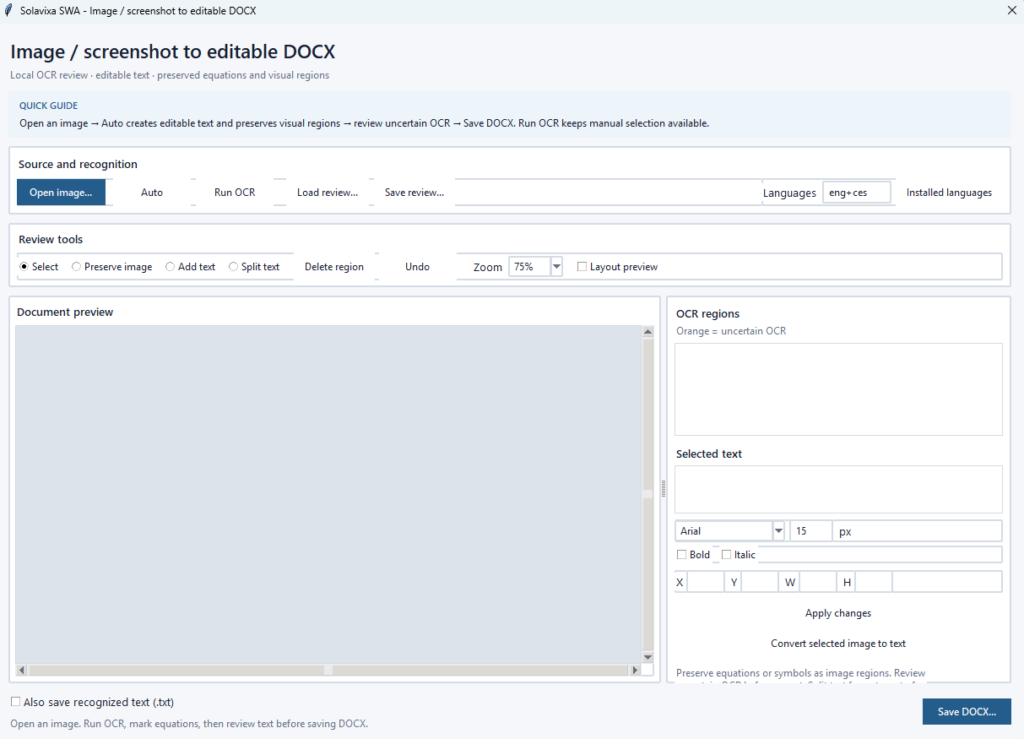
SWA 2.1 includes a dedicated Image / Screenshot to Editable DOCX workspace.
Open a supported image, run OCR, review the detected regions, correct the result if required, and export a hybrid DOCX containing editable recognized text together with original image regions where visual fidelity is more important.
Supported source formats include PNG, JPEG, WebP, BMP, and single-page TIFF.
Does Image / Screenshot OCR run locally?
Yes.
The image-to-DOCX workflow uses the locally installed Tesseract OCR engine and locally installed language data.
It does not require an online OCR account, external OCR API key, or cloud OCR service.
What is Auto OCR?
Auto is the recommended starting mode for Image / Screenshot conversion.
SWA analyzes recognized text, OCR confidence, mathematical notation, visual content, equations, symbols, and regions that may not be suitable for plain-text conversion.
It then proposes which areas should remain:
- editable text, or
- preserved original image regions.
The goal is to maximize editability without damaging equations, symbols, graphics, or visually sensitive content.
Does Auto OCR guarantee perfect recognition?
No
Auto is a practical classification aid, not a guarantee of perfect OCR or pixel-identical reconstruction.
OCR can sometimes recognize incorrect characters with high confidence, especially with mathematical symbols, small fonts, complex layouts, unusual typography, low contrast, or low-resolution images.
Important documents should always be reviewed before final use.
What happens to equations and mathematical symbols in Image OCR?
Where appropriate, equations, symbols, boxed formulas, and other visually sensitive regions can be retained as crops from the original source image instead of being converted into potentially incorrect text.
Neighboring normal text can remain editable.
This hybrid approach is one of the main advantages of the SWA image conversion workflow.
Can I correct the OCR result before saving?
Yes.
The OCR review editor allows you to:
- correct recognized text,
- change font family and size,
- apply bold or italic formatting,
- adjust region position and size,
- preserve additional image areas,
- convert selected image regions back to text,
- add missing text,
- split text regions,
- delete unwanted regions,
- and undo recent actions.
Can I save OCR work and continue later?
Yes.
Use Save review… to save the current OCR review as a .swa-ocr.json file.
To continue later, reopen the matching original image and load the saved review.
SWA checks the image fingerprint to help prevent a review from being applied to a different source image.
The review file does not contain the original image, so keep both files.
What does the Image OCR DOCX contain?
The generated DOCX uses a hybrid layout::
- recognized text remains editable,
- preserved regions use the original source pixels,
- supported straight rules can be recreated,
- long images can be divided across A4 pages,
- and preserved visual regions are kept together where possible.
This provides a balance between editability and visual fidelity.
Can Image OCR also create TXT?
Yes.
Enable Also save recognized text (.txt) before export.
The TXT contains recognized editable text in reading order.
Content intentionally preserved only as an image — for example an equation — is not automatically transcribed into the TXT output.
Is web-image OCR the same as Image / Screenshot to DOCX?
No.
These are separate functions.
OCR from web images (TXT) belongs to the normal web archive workflow and extracts text from suitable captured or embedded images.
Image / Screenshot to Editable DOCX is a dedicated conversion workspace with OCR, visual-region preservation, review tools, and DOCX export.
General Operation
Does SWA work locally on the user’s computer?
Yes.
SWA is a Windows desktop application and generated archive files are written to the selected local output folder.
Local HTML, ChatGPT export ZIP, and Image / Screenshot conversion work from locally selected source material.
A Web URL workflow naturally connects to the source website and may download content or assets required for the archive.
Licensing may also require online communication depending on the license type and activation state.
Does SWA upload my archived content to Solavixa?
SWA is not designed as a cloud hosting service for archived user content.
Its primary workflow creates files locally on the user’s computer.
License activation or validation communication is separate from the archived content itself.
Please see the Privacy Policy for current information about licensing and technical data processing.
Can SWA resume an interrupted archive?
Yes, for supported archive runs.
If a run is interrupted by a browser problem, system restart, application interruption, or another incomplete operation, SWA can use stored state from the interrupted archive folder to continue the same job.
Do not use Resume to append unrelated content to a completed archive.
What is Customer output mode?
Customer is the recommended normal mode.
It creates a clean output folder containing the selected final deliverables.
What is Advanced output mode?
Advanced keeps additional technical information such as diagnostics, state files, logs, and supporting data useful for troubleshooting or verification.
It is primarily intended for technical users and support situations.
Can SWA preserve images and attached files?
Customer is the recommended normal mode.Yes, where the selected source and workflow make those resources available.Customer is the recommended normal mode.
SWA can organize supported images and files into archive asset folders.
The exact result depends on the source content, accessibility of the resources, and selected output workflow.
Is SWA suitable for professional or business use?
Yes.
SWA is designed for professional documentation and archiving workflows including:
- research,
- consulting,
- AI conversation preservation,
- technical documentation,
- project records,
- customer documentation,
- offline archives,
- screenshot-to-document conversion,
- and long-term digital content preservation.
Is SWA a legal evidence or notarization tool?
No.
SWA is an archiving and documentation application.
It is not a notarization service, legal evidence certification service, or independent chain-of-custody platform.
Users are responsible for ensuring that they have the right to access, archive, process, store, and share the content they use with SWA.
Licensing
What is the difference between Trial, PRO, and Enterprise?
Trial
The Trial is intended for evaluation.
It is available for 7 days or up to 5 successful archive or conversion operations, whichever comes first.
PRO 1 Month
Provides the complete supported SWA feature set for 1 month on the licensed device.
A 14-day grace period follows the license expiration date.
PRO 3 Years
Provides the complete supported SWA feature set for 3 years on the licensed device.
A 14-day grace period follows the license expiration date.
Enterprise Lifetime
Provides lifetime Enterprise access according to the applicable license terms and activation model.
Enterprise Lifetime Multilicense
Provides a tailored licensing arrangement for teams, organizations, multiple users, or multiple devices.
Pricing is provided by individual quote.
Do paid licenses have different SWA features?
The normal paid SWA licenses provide access to the complete supported product feature set.
The main differences are license duration, activation model, and permitted deployment, rather than an intentionally reduced application feature set.
Always check the current Pricing and product pages for the commercial terms of each license.
What is the 14-day grace period?
For applicable term licenses, SWA allows a 14-day grace period after the displayed license expiration date.
During this period, the application identifies the license as being in its grace period while licensed functionality remains available.
After the grace period ends, the license becomes expired and requires renewal or another valid activation.
The grace period does not apply in the same way to Lifetime licenses because they do not use a normal term expiration date.
How is SWA activated?
SWA supports activation for compatible paid license types.
The License panel can display the active license state, license type, validity information, HWID-related information, activation controls, refresh controls, and supported Enterprise workflows.
Does SWA require an internet connection?
Not for every operation.
Normal output creation is primarily local.
However:
- Web URL archiving requires access to the source website.
- Online license activation or validation may require internet access.
- Enterprise workflows may support different activation methods according to the purchased license.
What operating system does SWA support?
Solavixa Web Archive Studio is currently designed for Microsoft Windows desktop systems.
Any future platform support should be confirmed on the current product page.
Tady tím zároveň opravíme současnou chybu, kde FAQ omylem uvádí SAR místo SWA.
Where can I find the SWA User Guide?
The Solavixa SWA 2.1 Professional User Guide provides detailed instructions for the complete application.
A separate SWA 2.1 OCR User Guide is also available for the Image / Screenshot to Editable DOCX workflow.
However:
Where can I find legal and policy information?
The Solavixa website provides:
- Terms and Conditions
- Software License Agreement (EULA)
- Privacy Policy
- Refund & Cancellation Policy
These documents contain the governing commercial, licensing, privacy, and usage terms.
Need more help?
For more information: