Solavixa Audio Recorder for Windows
Current version: 3.0
Record system audio, isolate individual applications, capture multiple apps as synchronized tracks, add a microphone, and save recent audio with Instant Replay.
Solavixa Audio Recorder (SAR) 3.0 is a Windows audio recorder built for users who need more control than traditional system-audio capture provides. Record the complete Windows output, capture only a selected application, exclude one application from the mix, or record multiple applications as synchronized separate tracks.
Add a microphone, create a synchronized Master Mix, and keep every source aligned on the same recording timeline. With Instant Replay, SAR can continuously retain recent audio in the background and save the last 30 seconds, 5 minutes, or 30 minutes — even when normal recording was never started.
🎧 Per-app capture · 🎚️ Synchronized multi-track · 🎙️ Microphone· ⏪ Instant Replay
More Than a System Audio Recorder
SAR 3.0 gives you precise control over what gets recorded. Capture the complete Windows audio output, isolate one application, exclude one application from the mix, or record multiple applications as synchronized audio sources.
Unlike a basic loopback recorder, SAR lets you build the recording around the sources you actually need — while keeping the workflow simple and local on your Windows PC.
🔊 Record Complete System Audio
Capture the full audio output from a selected Windows playback device. Ideal when you simply want everything you hear from your computer in one recording
🎯 Capture or Exclude One Application
Record only a selected application with INCLUDE mode — or use EXCLUDE mode to capture the remaining application audio while leaving one selected app out of the recording.
🎚️ Record Multiple Applications Separately
Select up to 8 applications and capture them as synchronized individual tracks. Keep the sources separate for later editing or combine them into a Master Mix.
🎙️ Add a Microphone and Master Mix
Add a microphone to your application recording, save it as a separate synchronized track, include it in the Master Mix, or do both at the same time.
One recorder. Multiple sources. Separate tracks. One synchronized timeline.
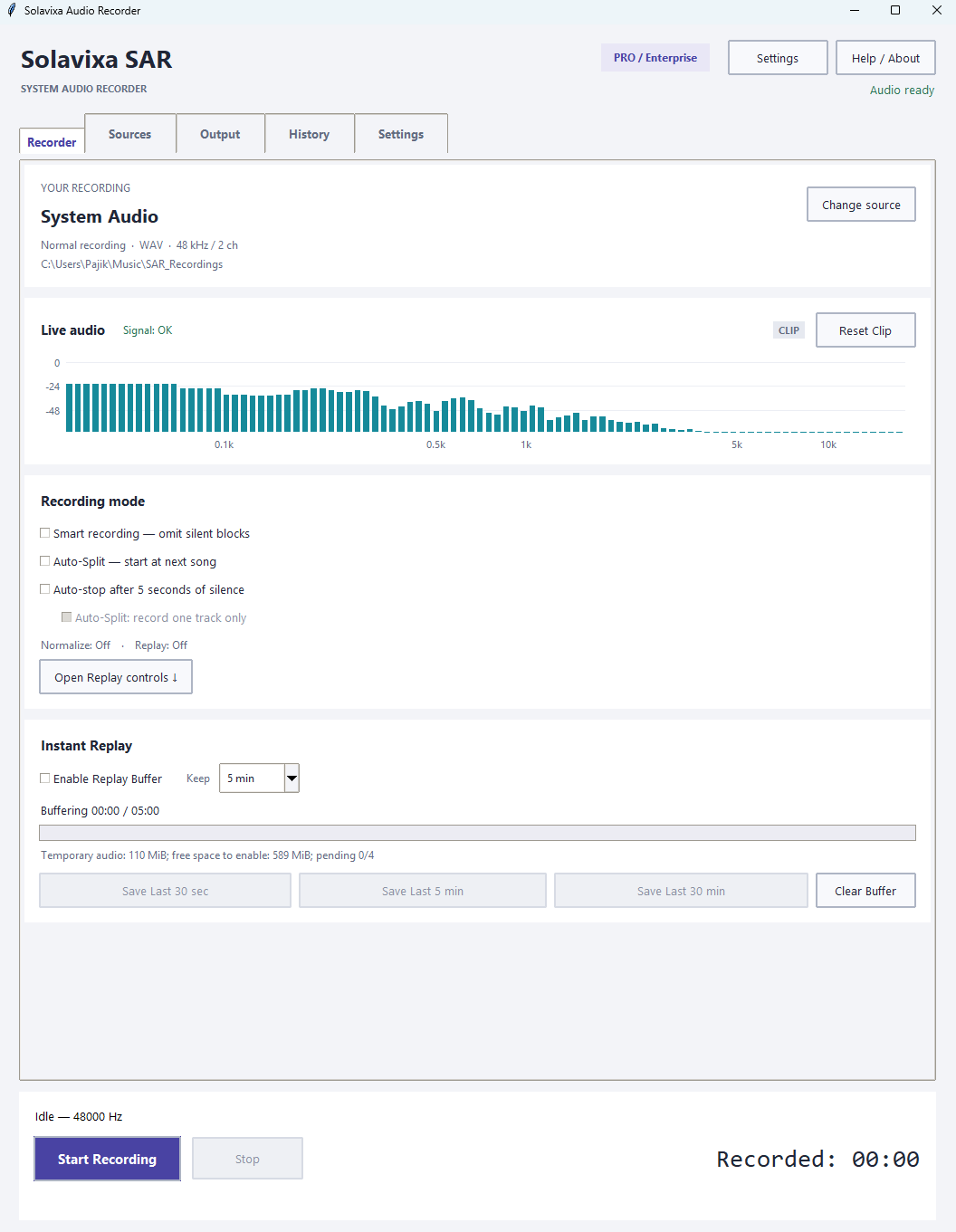
Instant Replay — Save What Already Happened
Not every important moment starts after you press Record. SAR 3.0 can continuously keep recent audio available in the background, so you can save what just happened — even if normal recording was never started.
Always Ready in the Background
Enable the Replay Buffer and SAR continuously maintains a rolling audio history on disk while your selected sources remain prepared. Choose how much recent audio you want to keep: 30 seconds, 5 minutes, or 30 minutes.
When something worth saving happens, simply click Save Last — SAR creates a recording from the recent audio already held in the buffer.
Save Last 30 sec
Save Last 5 min
Save Last 30 min
Works with Your Recording Workflow
Instant Replay can run without a normal recording, alongside an active recording, and even continue after you press Stop. In Multi-App sessions, Replay preserves the synchronized timeline of your selected applications, microphone, and Master Mix.
Replay also works independently from Smart Recording, Auto-stop, and Auto-Split, so your recent audio history remains based on real elapsed time.
Hear it first. Decide to save it afterwards.
Multi-App Recording with Microphone and Master Mix
SAR 3.0 can capture multiple applications at the same time and keep every source synchronized on a shared timeline. Record each application as a separate track, add a microphone, and create a ready-to-use Master Mix in the same session
Keep Every Source Separate
Select up to 8 applications and record them as individual synchronized audio tracks. Each source remains aligned with the others, making later editing, mixing, and cleanup much easier.
- Separate track for each selected application
- Optional separate microphone track
- Shared synchronized timeline
- No need for virtual audio cables
Create a Synchronized Master Mix
Enable Master Mix and SAR combines the selected application tracks into one synchronized output. Add your microphone to the Master when needed, while still keeping the original sources available as separate files.
The Master uses fixed source weighting, so if one source becomes silent or unavailable, the remaining sources do not suddenly jump in volume.
Separate tracks for editing. One Master Mix for immediate use.
Application Capture: INCLUDE or EXCLUDE
Choose exactly what should be recorded. SAR 3.0 can capture only one selected application, or do the opposite and leave one selected application out while recording the remaining application audio.
INCLUDE MODE
Record Only the Application You Need
Select an application such as Firefox, Chrome, a media player, or another supported Windows app and SAR records that application process tree while ignoring other application audio.
This is ideal when you want a clean recording from one program without notifications, music, calls, or audio from other running applications entering the file.
Selected application in. Other application audio out.
EXCLUDE MODE
Record Everything Except One Application
EXCLUDE mode reverses the workflow. Choose one application that should not be recorded and SAR captures the remaining supported application audio while leaving the selected process tree out
For example, you can exclude a browser, communication app, or another unwanted source while keeping the rest of the application mix.
Keep the mix. Remove the app you do not want.
Application Capture uses native Windows process-loopback technology — no virtual audio cable is required for supported applications.
Smart Recording, Auto-Split and Auto-stop
SAR 3.0 can do more than simply start and stop a recording. Choose an automatic recording mode to remove unwanted silence, detect track boundaries, or stop recording automatically when the audio ends.
AUTOMATIC RECORDING MODES
Smart Recording
Record only when meaningful audio is present. With a single source, SAR can omit silent blocks and continue recording when sound returns — useful for speech, intermittent audio, or sessions with long pauses.
Auto-Split
Detect silence between tracks and automatically create separate recordings. SAR can wait for the next track to begin, record it, save it, and continue with the following track — or stop after one complete track.
Auto-stop
Let SAR stop the recording automatically after approximately 5 seconds of continuous silence. Ideal when you want recording to end without having to press Stop manually.
Choose the mode that matches the recording — manual control is always available when you need it.
Fine-Tune How SAR Responds to Audio
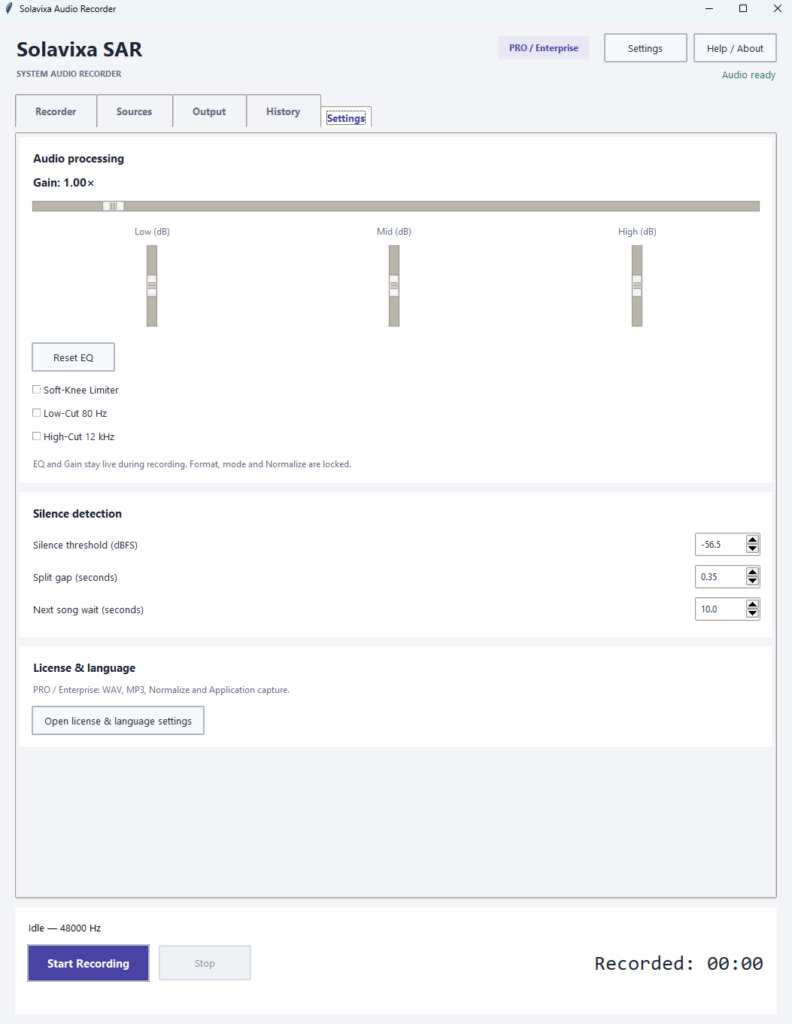
Adjust the silence threshold, Auto-Split gap, and next-track waiting time. SAR also gives you live Gain, three-band EQ, a Soft-Knee Limiter, Low-Cut and High-Cut filters for additional control over the captured signal.
Silence detection controls
Live Gain, EQ and filters
Settings remain accessible without cluttering the Recorder
Output, Export and Recovery
Choose the output that fits your workflow. SAR 3.0 supports lossless WAV recording, background MP3 export, automatic peak normalization, and recovery tools designed to protect audio when an export or session is interrupted.
Simple Output Controls
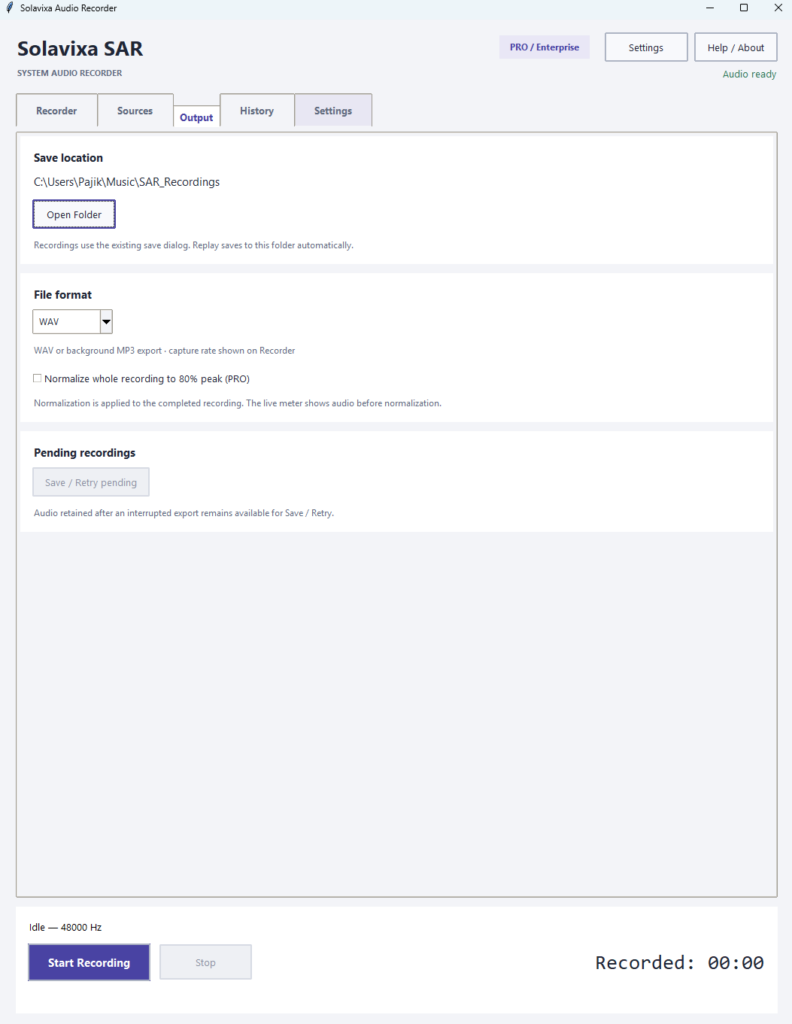
Choose WAV or MP3, open the recording folder directly from SAR, and enable Normalize when you want the finished recording automatically adjusted to a consistent peak level.
WAV for lossless recording
MP3 for compact distribution
Normalize to 80% peak
SAFE EXPORT WORKFLOW
Background MP3 Export
MP3 conversion runs in the background, so exporting a finished recording does not have to block the next recording session.
Normalize After Recording
Normalize analyzes the completed audio and scales the final output to an 80% peak target. It works after recording, independently from live Gain and EQ adjustments.
Pending Recording Recovery
If an export is interrupted after SAR has already preserved the audio, the recording can appear as Pending after restart. Use Save / Retry pending to recover and save the retained audio.
Designed to protect the recording first — export can always be retried.
Modern Interface. Clear Workflow. Seven Languages.
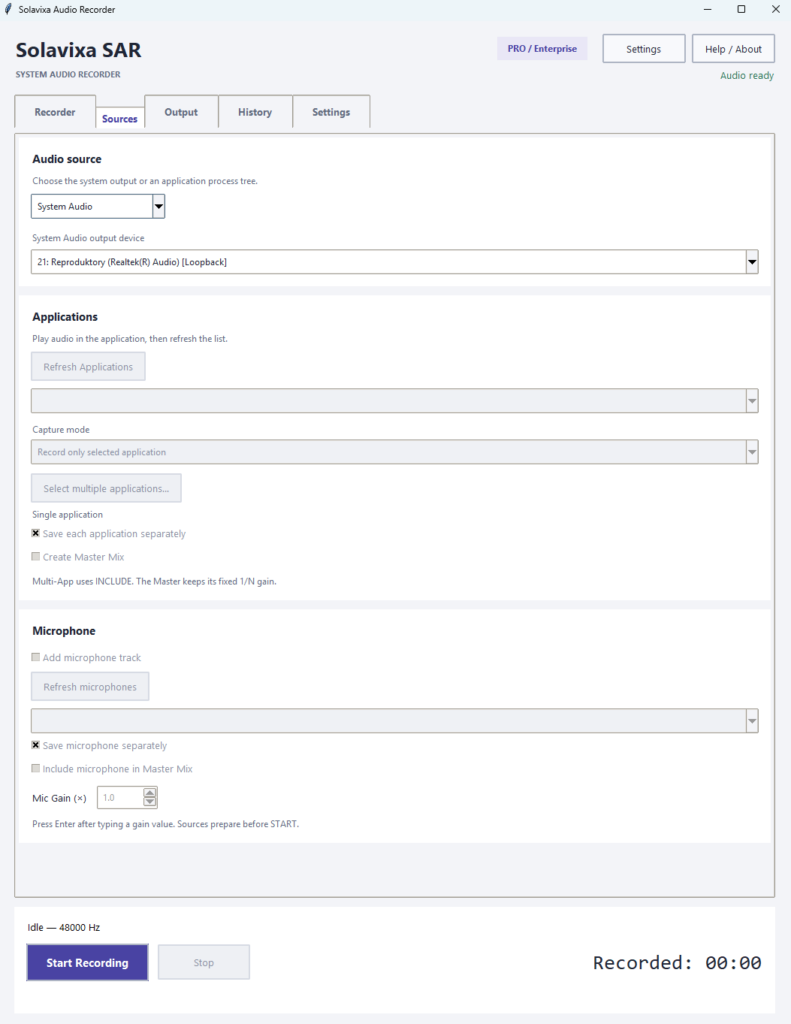
SAR 3.0 introduces a completely redesigned interface that separates recording, sources, output, history, and settings into clear sections. The goal is simple: keep advanced audio features accessible without turning the application into a complicated routing console.
Start Simple
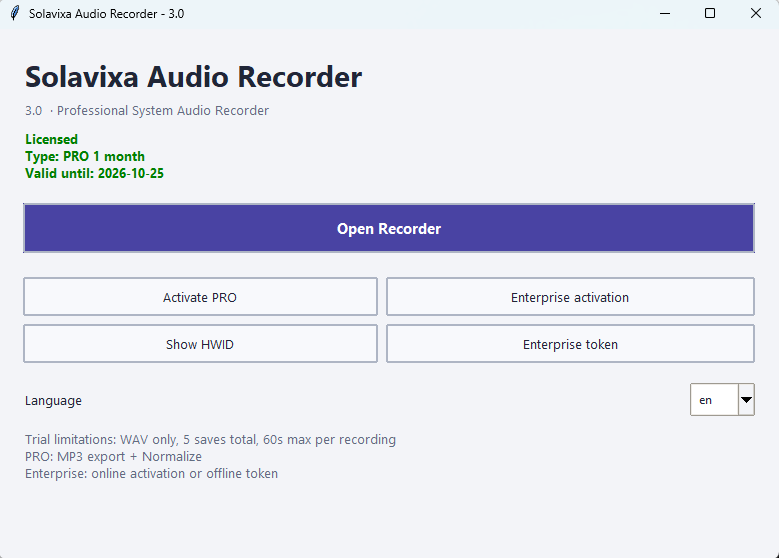
The main window keeps licensing, activation, hardware identification, language selection, and access to the Recorder in one compact place. Open the Recorder only when you are ready to work with audio.
Clear license status
Fast access to the Recorder
Language selection before recording
DESIGNED FOR EVERYDAY USE
Focused Navigation
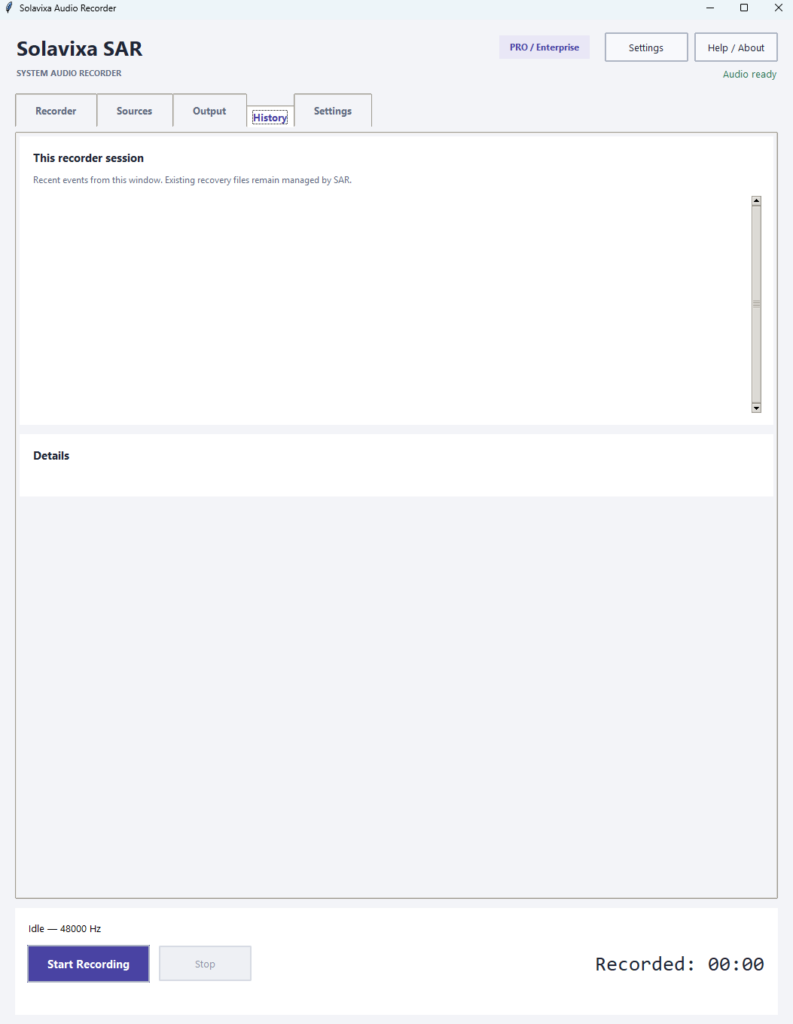
Recorder, Sources, Output, History, and Settings are separated into dedicated pages, so advanced features stay organized instead of competing for space in one crowded window.
Readable Status and Recovery Messages
SAR clearly reports recording state, source readiness, Replay status, export progress, and recovery information without requiring the user to understand low-level audio diagnostics.
Seven Interface Languages
Use SAR in English, Czech, German, French, Italian, Spanish, or Simplified Chinese. The main window and Recorder interface follow the selected language.
Advanced recording features without the complexity of a broadcast studio.
Built for Real Recording Scenarios
SAR 3.0 is designed for more than one recording style. Whether you need a clean capture from a single application, synchronized multi-track audio, a microphone alongside application sound, or the ability to save something that already happened, the workflow stays straightforward.
Record Only Firefox, Chrome, or Another App
Capture the full audio output from a selected Windows playback device. Ideal when you simply want everything you hear from your computer in one recording
Application Capture · INCLUDE
Record Two Apps Separately and Create a Master
Record only a selected application with INCLUDE mode — or use EXCLUDE mode to capture the remaining application audio while leaving one selected app out of the recording.
Multi-App · Separate Tracks · Master Mix
Add Your Voice to the Recording
Select up to 8 applications and capture them as synchronized individual tracks. Keep the sources separate for later editing or combine them into a Master Mix.
Microphone · Separate Track · Master Mix
Save What Happened Before You Pressed Record
Add a microphone to your application recording, save it as a separate synchronized track, include it in the Master Mix, or do both at the same time.
Instant Replay · 30 sec · 5 min · 30 min
From a simple one-app capture to synchronized multi-source recording — SAR adapts to the session instead of forcing every recording into the same workflow.
Reliable by Design
SAR 3.0 is built to keep recording workflows stable even when something unexpected happens. Source failures, interrupted exports, and long-running sessions are handled conservatively so captured audio is protected whenever possible.
SOURCE FAILURE HANDLING
One Source Can Fail Without Ending the Session
In a Multi-App or microphone session, one source can become unavailable while the remaining sources continue recording. Existing audio from the failed source is preserved and its future synchronized timeline is filled with silence.
No Silent Fallback to the Wrong Device or App
SAR does not automatically switch to another application or microphone when the selected source disappears. Reconnect the original source and use Refresh to restore it explicitly.
EXPORT & RECOVERY
Background Export
WAV and MP3 processing is separated from the live capture path, so long exports do not have to block the next recording session.
Recover Pending Recordings
If SAR or an export is interrupted after audio has already been retained, the recording can reappear as Pending after restart. Use Save / Retry pending to recover and save the retained audio.
Seven Interface Languages
Use SAR in English, Czech, German, French, Italian, Spanish, or Simplified Chinese. The main window and Recorder interface follow the selected language.
Capture first. Protect the audio. Finish the export afterwards.
Choose the License That Fits Your Workflow
Start with the Trial and explore the SAR workflow before activating a paid license. PRO and Enterprise unlock the advanced recording features designed for application capture, multi-source sessions, Replay, and flexible export..
TRY SAR FIRST
Trial
Evaluate the core recording workflow before purchasing a license. Trial recordings are limited to WAV output, up to 60 seconds per recording, and 5 saved recordings in total.
Ideal for testing compatibility and basic recording on your PC.
FULL RECORDING WORKFLOW
Pro
Unlock Application Capture, Multi-App recording, microphone workflows, MP3 export, Normalize, Instant Replay, and the advanced recording tools available in SAR 3.0.
For everyday recording, content creation, tutorials, research, and advanced desktop audio workflows.
LONG-TERM / BUSINESS USE
Enterprise
For users and organizations that need Enterprise licensing, including the available online or offline token activation workflow.
Designed for long-term professional deployment and managed licensing scenarios.
See the Pricing page for current license options and terms.
ℹ️ Legal and usage note
🔹SAR is intended for lawful and permitted recording workflows. Users are responsible for ensuring that their recording activity complies with applicable laws, rights, and platform or workplace rules.
Solavixa Audio Recorder is built for Windows desktop use. You can learn more about the Windows platform on the official Microsoft Windows website.
Ready to Take Control of Your Windows Audio?
Record the complete system output, isolate individual applications, capture multiple apps as synchronized tracks, add your microphone, create a Master Mix, and save recent audio with Instant Replay — all from one focused Windows recorder.
Download SAR 3.0 and choose the recording workflow that fits the moment.
Windows desktop application · 7 interface languages · Local recording workflow